 ESPectre
Choose your detection profile
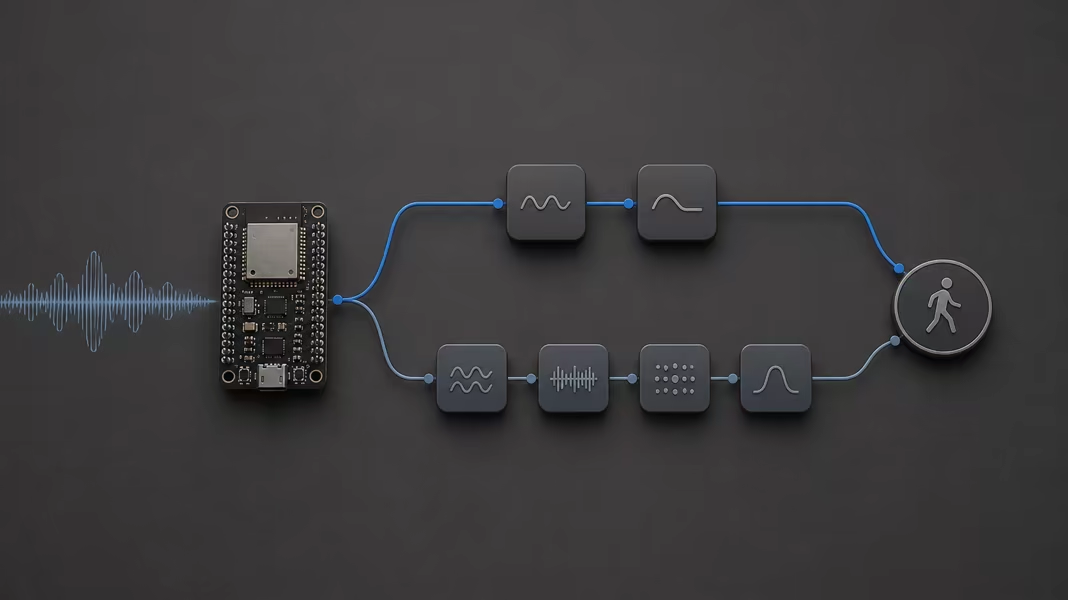
ESPectre has two motion detectors. Both read the same Wi-Fi CSI and report the same motion state. Lightweight is the default and uses less CPU and memory. High Accuracy uses a small neural network and gives fewer false alarms and missed detections in our tests.
Sections
How the two profiles differ
| Lightweight | High Accuracy | |
|---|---|---|
| How it decides | Combines two signal features with fixed weights, then compares the result with a threshold learned in your room. | Feeds eight signal features to a small neural network built into the firmware. It starts from a default threshold instead of learning one. |
| Startup | Calibrates on about ten seconds of quiet data. Movement in that window extends it, up to about thirty seconds. | No calibration. It starts once it has a full window of CSI, a few seconds after boot. |
| Cost | Less CPU and memory. | More CPU and memory for the extra features and the network. |
| Choose it when | The chip is small or also runs a display, Matter, or other services. | Fewer false alarms and missed movement matter more than CPU. |
If unsure, start with Lightweight, then try High Accuracy in the same spot with the same traffic source, and keep the one that works better in your room. Neither profile needs training from you, and neither is a power-saving mode: power use has not been measured.
How to select it
Pick your firmware type. You can change the profile while the device runs, and the choice is saved. On Matter, this setting is available over Direct HTTP, not through the standard Matter controls.
Native MQTT shell
Connect to the broker and select the device. The change applies at once and survives reboots:
./espectre mqtt --broker 192.168.1.20
espectre> update_sensing detector=high_accuracy
Check that the shell reports an accepted result, then open Live motion on the same device and verify Detection mode. MQTT clients can also read detector from the retained sensing topic. Use update_sensing detector=lightweight to switch back.
Home Assistant shows a detector selector, and the choice is saved. In YAML, detection_algorithm sets the profile to use until you pick one:
espectre:
  detection_algorithm: lightweight  # or high_accuracy
Published Matter images start with Lightweight. Open Live motion to switch profile; the change applies at once and survives reboots. Your own builds can also set the starting profile in the ESP-IDF configuration.
Set the detector in the runtime configuration before starting ESPectre:
espectre::RuntimeConfig config;
config.detection_algorithm = espectre::DetectionAlgorithm::HIGH_ACCURACY;
Choose a traffic source
The traffic source determines how the sensor gets its CSI measurements. The detection profile determines how it interprets them. You choose these settings separately, and both profiles need a regular stream of usable CSI.
| Traffic source | When to use it |
|---|---|
| Ping (ICMP) | The default. Sends ping requests and measures CSI from the replies. Keep it when CSI arrives regularly. |
| DNS (UDP) / DNS (TCP) | Alternatives when the router blocks or limits ping. The destination must answer DNS queries over the selected protocol. |
| Wi-Fi raw | Sends Wi-Fi frames directly and measures CSI from their acknowledgments. Unavailable on ESP32-C6. |
| External device | Receives traffic from another device, such as the Home Assistant traffic generator app. The external sender must stay running for sensing to continue. |
In Live motion, open Advanced sensing settings and choose Wi-Fi traffic source. The device saves your choice and never switches sources on its own. Changing the source restarts Lightweight calibration.
Check CSI occupancy in Diagnostics: it shows how much of the detector window contains usable measurements. A high packet count alone does not guarantee regular CSI, and High Accuracy also needs enough input before it can detect motion. For missing or irregular input, follow the traffic troubleshooting steps.
Measured results
The SDK detector reference lists recall, false-positive rate, detection time, and CPU load for both profiles on the same recordings, and explains how each detector works step by step.